WordPress Activity Log: Track User Changes Inside the Admin
WordPress does not keep a usable history of who changed a plugin, role, or setting. An activity log UI turns that guesswork into an audit trail.
27th of May, 2026 4 min read uiXpress
WordPress keeps revisions for posts. It does not keep a usable history of who changed a setting, activated a plugin, deleted a user, or edited a product. When something breaks, the conversation becomes “who did this?” and the honest answer is often “we don’t know.”
That is why people look for a WordPress activity log, user activity tracking, and even “activity log UI.” They want a readable feed — who, what, when — not a raw server log and not another SaaS agent on the front end.
What an activity log should record
A useful WordPress activity log is closer to an audit trail than an analytics pixel. At minimum it should capture:
- Logins and failed logins
- Plugin and theme activations, updates, and deletions
- User creates, role changes, and deletions
- Post, page, and product edits, including deletions
- Option and settings changes where possible
- The actor, IP, and a timestamp you can filter
The UI matters as much as the data. If you cannot filter by user, action, or date, you do not have an activity log. You have a growing table.
Why default WordPress is not enough
Core gives you post revisions and a few dashboard widgets. It does not tell you:
- Which administrator changed a permalink structure
- Which contractor installed a plugin at 2am
- Whether a client deleted a product or a staff member did
- What a user looked like before a role change
On agency retainers, those questions are billing questions as much as technical ones. On WooCommerce sites, they are also dispute questions.
Activity logs after a year of WordPress security news
2026 has already had a cluster of core security releases, including a high-severity login-page issue patched in the 7.0.3 line. You still need to update. You also need to know what happened after someone got in — or after a tired admin clicked the wrong thing.
An activity log will not stop a vulnerability. It will tell you which user, plugin, or option changed in the window you care about. That shortens incident response from “restore the whole backup” to “revert this change.”
What a good activity log UI looks like
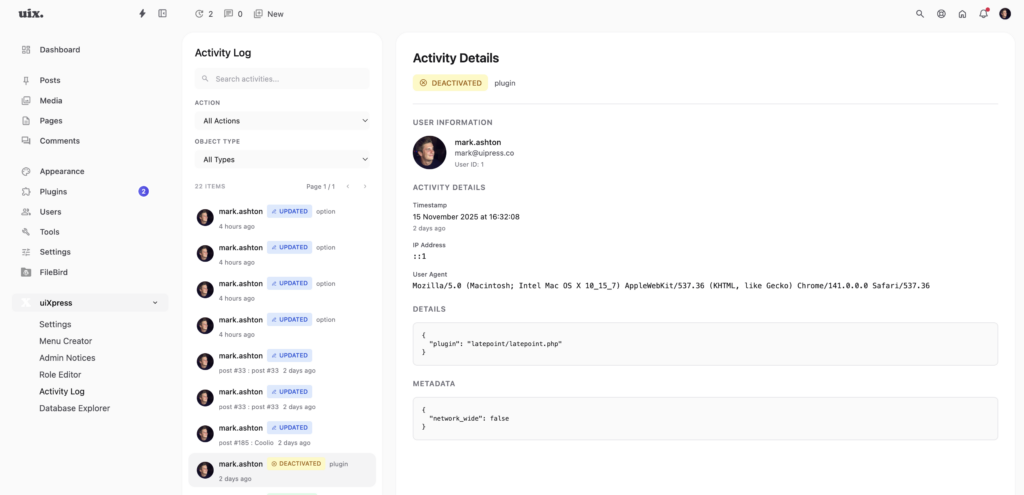
Searchers who type “activity log UI” are usually tired of dense tables. A usable design looks more like a modern admin feed:
- A list with avatars, action badges, and relative times
- A detail panel with before-and-after values
- Filters for user, action type, object type, and date range
- Search across the message, not just the username
- Export or retention settings so the log does not grow forever
Side-by-side old/new values are the feature that turns a log into evidence. “User updated post 4821” is a hint. Showing the title change is an answer.
How to roll out activity logging without creating noise
- Log administrative events first: plugins, users, settings, deletions.
- Decide whether front-end customer actions belong here. Usually they do not.
- Set a retention window. Ninety days is enough for most retainers; regulated sites may need more.
- Restrict the log to roles that should see other people’s actions.
- Tell the team it exists. Surprise surveillance is how you lose contractors.
Do not log passwords, payment fields, or post content that includes private customer data unless you have a reason and a retention policy.
Activity logging in uiXpress
uiXpress includes an activity logger with a split list/detail UI: avatars, action badges, filters, and before/after comparison. It sits in the same modern admin as the role editor and plugin manager, which is the point. Permissions, plugin changes, and the audit trail belong together.
For agencies, that means you can white-label the admin for the client, keep the logger visible to your staff, and stop asking Slack who published the broken page.
Activity log vs analytics vs revisions
These get mixed up in search results.
- Revisions show how a post changed. They do not show who changed a plugin.
- Analytics show how visitors behaved. They do not show how staff behaved.
- Activity logs show how authenticated users changed the site.
You may want all three. You should not expect one dashboard widget to cover them.
A simple policy you can write in one paragraph
Write this into your handover doc: “We log administrative changes for 90 days. The log is visible to administrators. We use it to diagnose issues and to review access. We do not log customer payment details.” That sentence prevents most of the awkward conversations.
If you came here looking for a WordPress activity log, start with coverage and UI, then worry about extra destinations like Slack or email. A log nobody can scan is only slightly better than no log at all.