Manage Multiple WordPress Sites from One Admin
Remote WordPress management should not be a pile of admin tabs. Connect sites with application passwords and keep a visible site context before you update.
6th of August, 2026 4 min read uiXpress
Most agencies still manage WordPress as a row of logins. One tab per client, a password manager, and a hope that you are not updating plugins on the wrong site. Search queries like “wp remote,” “remote WordPress,” and “remote site management” are people looking for a way to work across installs without that tab pile.
There is already a category for this — manage-WP-style dashboards, host panels, and multisite. They are not the same job as switching site context inside a modern admin you already use for content, plugins, and users.
Remote sites vs multisite vs a SaaS manager
Pick the model that matches how the sites are actually hosted.
- Multisite is one WordPress install, many sites, one user table. Fine for a network you control. Useless when each client is on a different host with a different database.
- A hosted manager (MainWP, ManageWP, and similar) is a control plane: updates, backups, uptime. Strong at fleet maintenance. Weaker if you want to work inside that site’s posts, media, and users with your usual admin UI.
- Remote sites inside the admin connect other WordPress installs to the workspace you are already in, then route supported requests to the selected site.
If your day is “update twenty sites,” a fleet tool wins. If your day is “fix this client’s admin, then the next,” staying in one admin theme and switching site context is the better fit.
What a safe remote connection requires
Do not paste an Administrator password into a plugin and call it remote management.
- Application passwords, not the user’s login password. WordPress supports this natively. Revoke is one click when a contractor leaves.
- Encrypted storage on the host site. Credentials should not sit in a browser or a plaintext option.
- Capability checks on who can add or use a connection. Not every editor should see every client.
- Clear site context on every screen. The worst remote-management bug is acting on the wrong install.
- HTTPS and a user who can be limited. Prefer a dedicated application-password user over your personal super admin.
If a tool wants FTP plus admin credentials to “manage everything,” treat that as a last resort, not a default.
A workflow that does not mix up clients
- Create a dedicated user on the remote site with only the capabilities you need.
- Generate an application password for that user. Label it with the connecting site’s name.
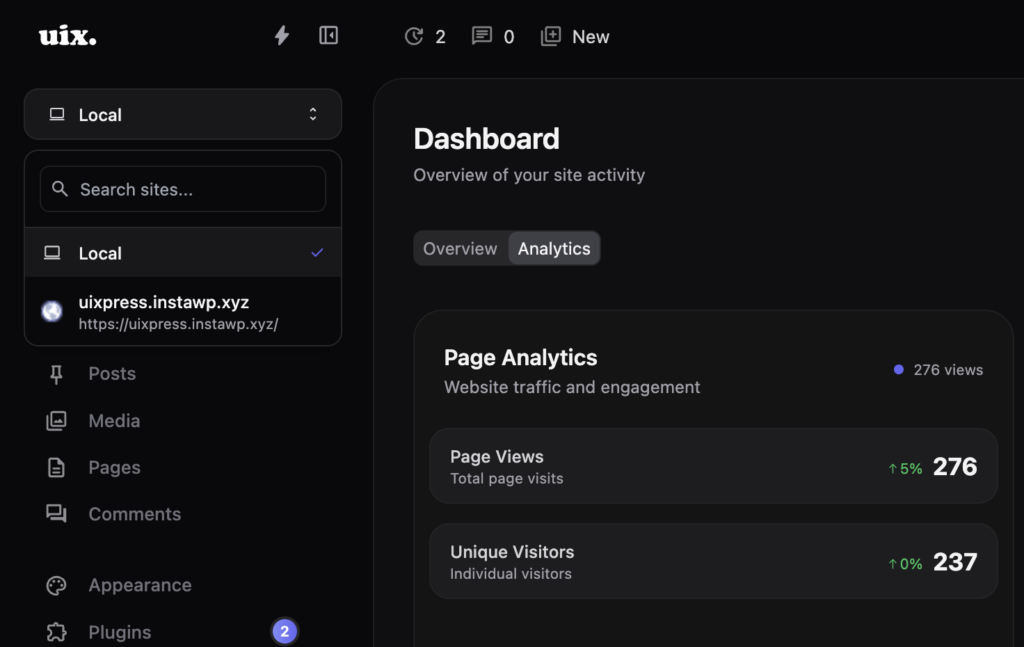
- Add the connection from your hub admin. Confirm the site title in the switcher before you touch plugins.
- Do the work. Check the site indicator before updates or deletions.
- Revoke the application password when the project ends, even if you keep the row for later.
Write the site name into the activity log habit too. If something goes wrong, you want “we updated plugins on Client B at 14:10,” not a guess.
Remote sites in uiXpress
uiXpress Remote Sites connects other WordPress installs into the same admin: application-password auth, credentials encrypted on the host, capability checks, and a switcher that persists as you move between supported tools. REST requests route to the selected site so you are not copy-pasting between tabs.
The point is not to replace your backup or uptime stack. The point is to keep plugin management, content, and users in the admin theme you already standardised — locally or remotely — without a second product’s UI.
When you should not use in-admin remote access
Skip it and use the host or a fleet tool when:
- The site is down and wp-admin will not load
- You need server-level backups, migrations, or PHP upgrades
- You do not have a trusted Administrator who can create an application password
- A compliance rule forbids storing any remote credential on another site
Remote admin is for sites that are healthy enough to answer the REST API.
One hub, many clients
Agencies get the most from this when the hub site is yours — a staging or operations install running the same admin theme as the clients. Standardise roles, dashboards, and plugin policy there, then switch into a client only when you need their content or their plugin list.
Managing multiple WordPress sites from one admin is not magic. It is authentication, a visible site context, and the discipline to revoke access. If you have been jumping through a dozen /wp-admin tabs, that is the layer to add next.